

What is an Auto Update?
When new versions of safety data sheets (SDSs) are added to the VelocityEHS database, the Chemical Management solution automatically compares them against the SDSs in your eBinder. By default, when the system finds a match based on our versioning rules, the newer version is added directly to your eBinder and indexed data is copied from the older version to the newer one. These are called auto updates, and they help you stay compliant with various regulations.
How the Auto Update Process Works
The auto update process occurs in two steps, using product and document criteria to determine whether an SDS matches an existing product in your eBinder and qualifies as a newer version. The update occurs only when both steps are satisfied.
Step 1: Compare Product Criteria
The system evaluates the following product criteria to determine whether an SDS matches an existing product in your eBinder:
- Manufacturer Group
- Supplier
- Product Name
- Product Code
- Language
Step 2: Compare Document Criteria
If a product match is found, the system evaluates the following document criteria to determine whether the SDS is a newer version of the existing document:
- Manufacturer Name
- Regulatory Format/Country/Region
- Revision Date
Note the following:
- By default, auto updates are placed directly into your eBinder. You can instead configure document routing settings to send auto updates to your Queue for review.
- Spaces and certain characters (such as commas and periods) are ignored when matching Product Name and Product Code fields.
- If an SDS Revision Date does not change, the system may not recognize the SDS as a newer version for auto update processing.
Understanding Manufacturer Groups
Manufacturer Group is one of the Product Criteria used during matching. Manufacturer Groups allow related manufacturer names to be treated as the same company, improving auto update accuracy when manufacturers publish SDSs under different business names.
You may see both a Manufacturer and a Manufacturer Group listed for a product in Chemical Management. The Manufacturer reflects the name shown on the SDS, while the Manufacturer Group is the standardized name used in the VelocityEHS Master Company List.
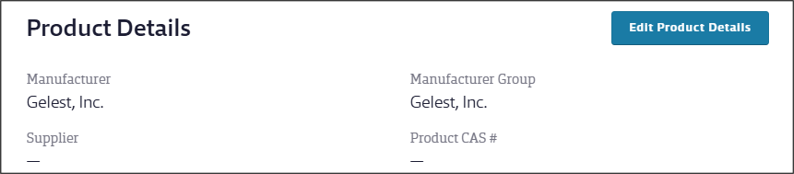
The manufacturer name does not need to be an exact match between SDS versions for the SDSs to be recognized as the same product. For example, several variations of Dow Chemical names (Dow Chemical USA, Dow Chemical Company, Dow Corning Corporation, Rohm and Haas Company, and DowBrands) are grouped together so they are recognized as the same manufacturer during matching. The Manufacturer listed on the SDS may differ from the Manufacturer Group shown in the VelocityEHS Master Company List.
Why an Auto Update May Not Occur
The most common reason a newer SDS does not auto update is that one or more Product Criteria no longer match. If this is the case, the system cannot identify the SDS as a newer version of the existing product, so an auto update cannot occur. For example, the manufacturer may have changed the Manufacturer or Supplier Name, Product Name, or Product Code. In these situations, you can manually add the newer SDS to your eBinder, copy data from the older version, and archive the older version if appropriate.
