

How to Use the AI Description Analyzer
The AI Description Analyzer helps you write stronger, clearer incident descriptions by providing a score from 1 to 5, along with improvement suggestions. This tool plays a key role in unlocking the AI PSIF Insights by ensuring there is enough context to evaluate the incident accurately.
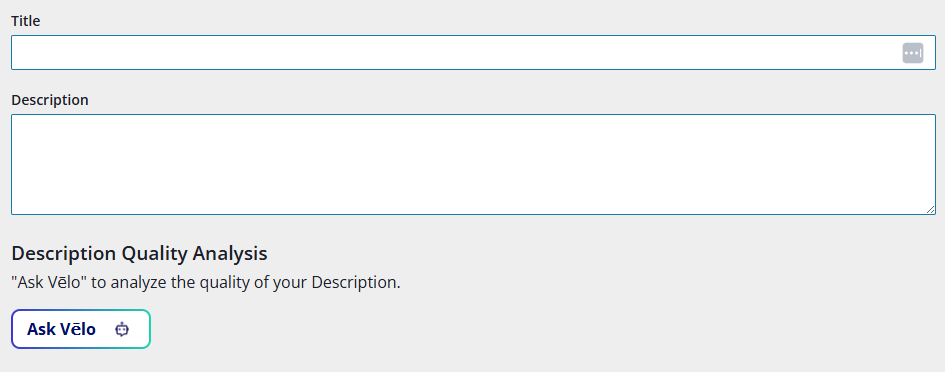
When the AI Description Analyzer Appears
The AI Description Analyzer is available only when the following conditions are met:
- The record is categorized as an Incident or Near Miss
- The AI Description Analyzer feature is turned on
Once available, users will see the Ask Vēlo button in the Description Quality Analysis section, located directly below the Description field.
The AI Description Analyzer can be turned on independently, even if AI PSIF Insights are not enabled. However, if AI PSIF Insights are enabled, the AI Description Analyzer must also be turned on to support them.
How to Use the Tool
- Enter a detailed description of the incident or near miss.
- Select Ask Vēlo button in the Description Quality Analysis field.
- The AI will return:
- A description quality rating (1–5)
- Improvement Suggestions, such as vague phrases or missing context
A score of 3 or higher is required to utilize the AI PSIF Insights tool.
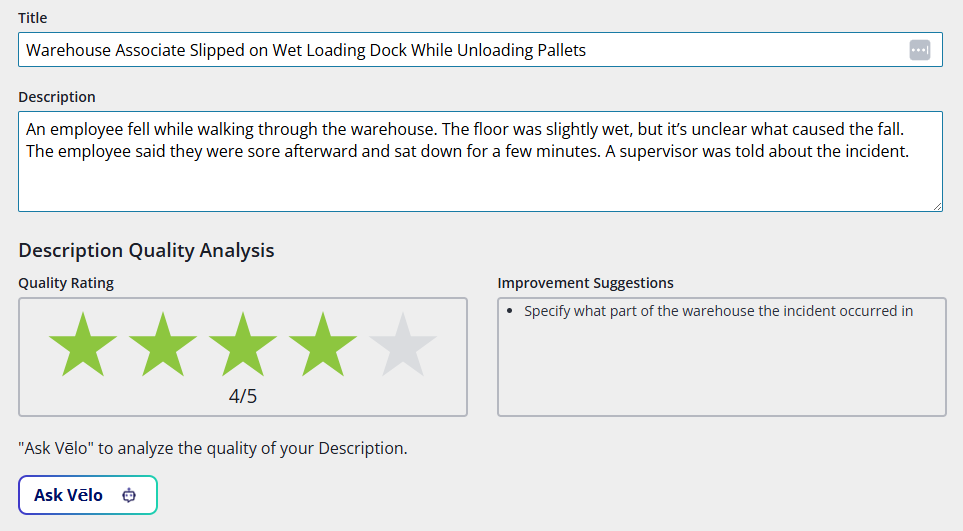
Interpreting the Results
Score Range | Meaning |
1–2 | Low-quality: vague, unclear, or missing critical information |
3–4 | Moderate quality: some improvement may be needed |
5 | Strong quality: detailed and clear description |
Improvement suggestions may include prompts like:
- Add more details about the incident
- Remove a person’s name
- Clarify the actions that occurred
- Avoid using general terms without context
Tips for Writing Better Descriptions
- Be specific: include names of tools, materials, and actions taken
- Cover key details: who, what, where, when, and how
- Avoid vague language like “something went wrong” or “issue occurred”
After Using the AI Description Analyzer
If the description strength score is 3 or higher, investigators can evaluate the record with AI PSIF Insights in the next step of the process.
If the description is edited after using the analyzer, Ask Vēlo must be selected again. Otherwise, all AI-generated results will be cleared. A prompt will appear warning of this scenario before the record can be saved.
