

Chemical Management Searches Report
The Chemical Management capability Searches Report is only available for SDS Management and Chemical Management.
The information in this article is specific to the Chemical Management Searches Report. If you need information on reports in general see Reports Overview.
The capability Searches Report is an easy way to see which search terms your users are searching for in both your eBinder and in Chemical Management Search. This can help you determine if users search for certain products more often than others, or if there are synonyms you may need to add to products in your eBinder.
Select Date Range

The date range allows you to see searches done within a specific time frame. Clicking in the fields brings up a calendar from which you can select the date.
VelocityEHS recommends that if your account has high usage that you select a narrow date range. If you select a wide date range, your report may contain a large number of rows since each search term will be on its own row.
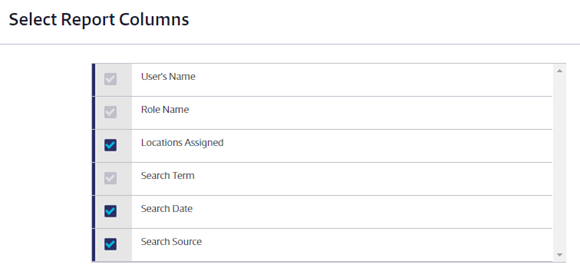
Select Report Columns
Choose the additional data that you would like to appear in the report columns.
Some columns will be required and cannot be unchecked. You can select as many additional columns as you need. The Search Source column will indicate whether the search term was used in the eBinder or Chemical Management Search.
Once you’ve made all of the selections for your Chemical Management Searches Report click the Run Report button at the bottom of the page.
