

Risk Phrases Indexing
Risk Phrases indexing options are available only for GM Pro, SDS Management, and Chemical Management accounts.
If you want to print labels or run reports with Risk Phrases included, you must first index this information in the Product Summary.
Before you can index Risk Phrases, ensure the module is enabled in your account and turned on in the Product Summary. See Indexing Safety Data Sheet Information for more information.
Once the module is turned on, click Manage Risk Phrases at the top right of the module.

On the Manage Risk Phrases page you can review the safety data sheet on the right-hand side. Use the toggle buttons at the top right to show or hide the PDF.
If there are Risk Phrases listed on the safety data sheet you can use the checkboxes for the options on the left to make your selections. Your Chemical Management account comes standard with the pre-populated list of Risk Phrases options from which you can choose. You can use the Filter Risk Phrases field to search for a specific item.
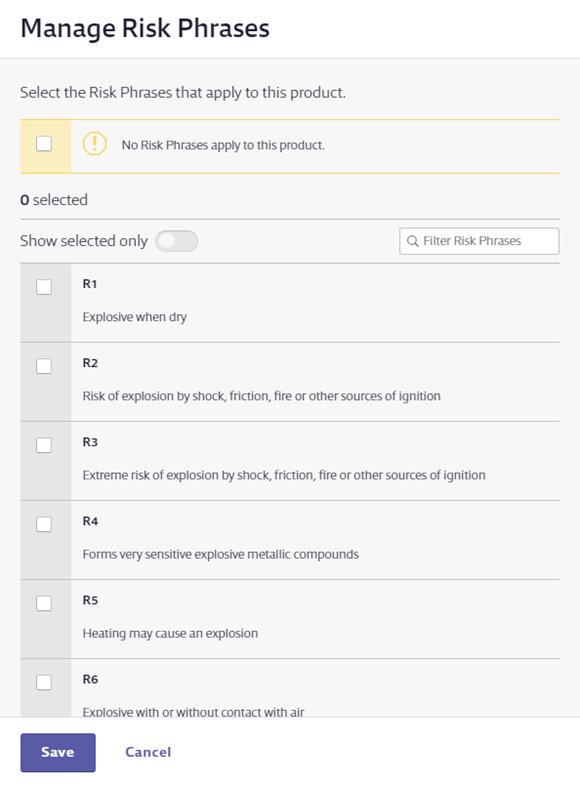
Select all Risk Phrases options you need to index, and then click Save. You will see the name of the Risk Phrases and any relevant pictograms in the Risk Phrases module.

If there are no Risk Phrases listed on the safety data sheet and you want to indicate this in the Product Summary, select the checkbox for No Risk Phrases apply to this product. This lets users know that you reviewed the safety data sheet and determined that no Risk Phrases were listed.
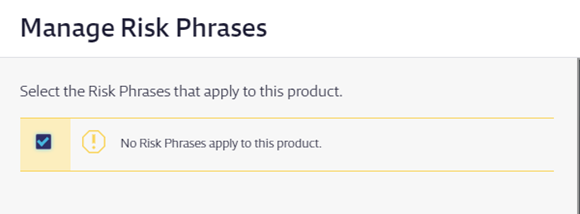
Click Save.

