

System Settings
To access your Training & Learning system settings, select the gear icon > System Settings at the top right of the page.
Note: Only Administrators have access to System Settings.
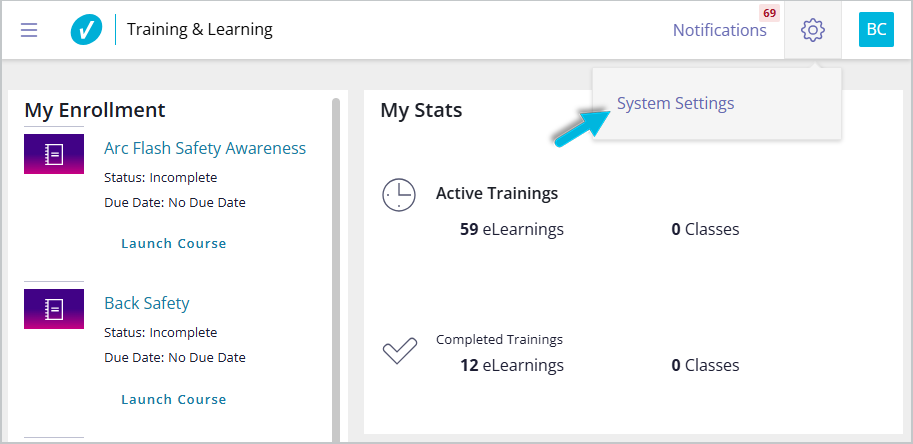
On the Customer Profile page, there are several options:
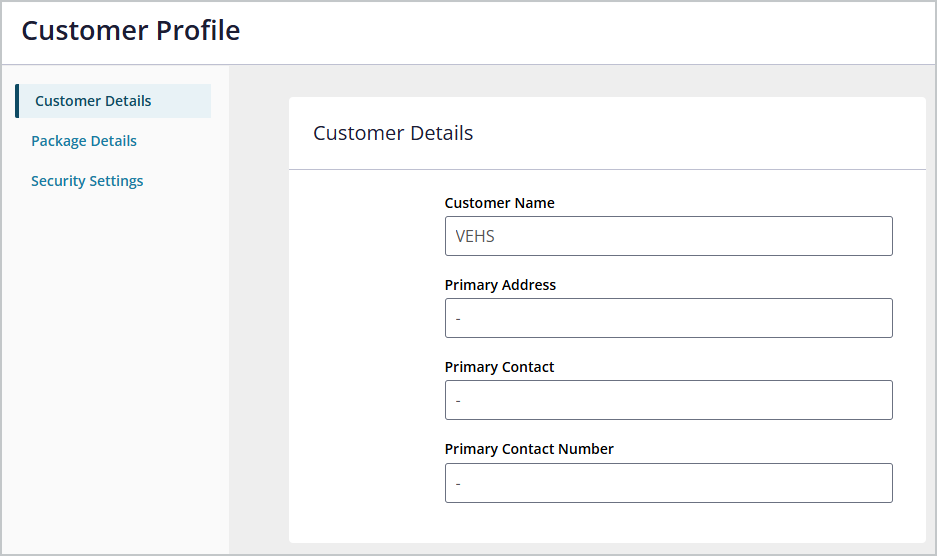
Customer Details
Customer Details includes:
- Customer Name – your organization or company’s name
- Primary Address – the address your company has on file with VelocityEHS
- Primary Contact – the user that VelocityEHS has on file as the main contact for your account
- Primary Contact Number – the phone number associated with the primary contact
If any of this information is incorrect or missing, please email Customer Support with the correct information.
Package Details
Package Details includes:
- Package Type – describes the set of training courses your contract includes and your account type.
- User Limit – maximum number of active users you can have in your account per your contract
- Number of Total Courses – total number of courses available to users to complete per year, per your contract
- Number of Active Users – current number of users with an Active status in your account
- Contract Start Date – the date VelocityEHS has on file as the date your contract began
- Provisioned Packages – packages provided for the organization (click to view and edit package details)
Security Settings
Security Settings include a couple of options.
Login Type
Indicate how Training & Learning users will access their account:
- SSO – Single Sign-On
- Credentials – User name and password
- Mixed – can use SSO and/or credentials
Email Option
While VelocityEHS recommends all Training & Learning users have email addresses for security/verification and notification purposes, there are three options to choose from.
- Require User Email – User email address is required; all users will receive system notification emails. Administrators cannot manually set user passwords.
- Send system notification emails to everyone with a valid email – User email address is optional; users with an email address will receive system notification emails. Administrators can manually set user passwords.
- Do not send system notification emails – User email address is optional; users with an email address will receive one email, for account verification. Administrators can manually set user passwords.
For additional information about Training & Learning notifications, see Notifications.
Note: If you want to require user email addresses but some users who need training do not have one, see this FAQ.
